

In the world of modern software development, data is rarely stored in a single, monolithic table. To maintain data integrity and reduce redundancy, we follow the principles of normalisation — splitting data into logical entities such as Users, Orders, Products, and Categories.
However, data is only useful when it can be reconstructed to provide insights. This is where the JOIN comes in. Mastering JOINs is not just about knowing the syntax; it is about understanding how to traverse relational paths efficiently to provide the right data at the right time.
Every JOIN operation consists of three main components: the Left Table (the first table in the FROM clause), the Right Table (the table after the JOIN keyword), and the Join Condition (the logic defined after ON that dictates how rows are paired).
SELECT *
FROM   Users          -- Left table
INNER JOIN Orders     -- Right table
  ON Users.id = Orders.user_id;  -- Condition
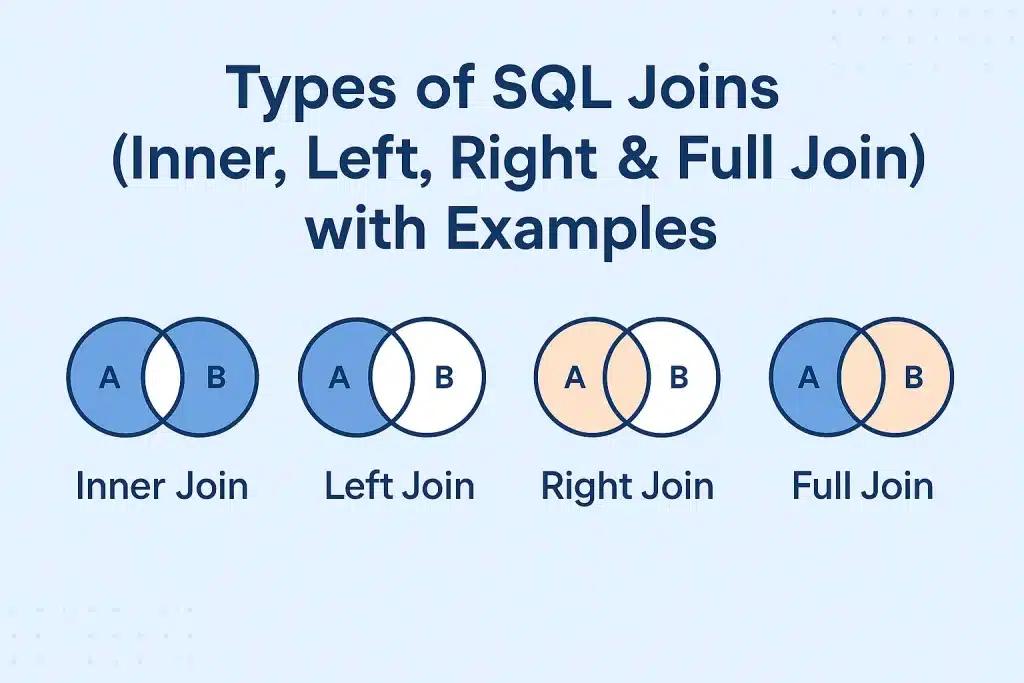
The INNER JOIN is the default join type. It returns only the rows where there is a match in both the left and right tables. If a row in the left table does not have a corresponding entry in the right table, it is discarded from the result set entirely.
Use INNER JOIN when you need a strict relationship. For example: "Show me all customers who have placed an order." If a customer exists but has not bought anything, they should not appear on this list. INNER JOINs are generally the fastest join type because the database engine can discard non-matching rows early in the process.
SELECT
    u.username,
    o.order_date
FROM users u
INNER JOIN orders o
  ON u.id = o.user_id;
The LEFT OUTER JOIN (commonly called LEFT JOIN) returns all rows from the left table, and the matched rows from the right table. If there is no match, the right side results in NULL values. This makes it the go-to choice for reporting and gap analysis.
Common use cases include listing all users with their total spend even if it is zero, or identifying which users have never logged in by filtering on WHERE logs.id IS NULL. Always be prepared to handle NULLs in your application code — use COALESCE() or IFNULL() to provide safe default values.
SELECT
    u.username,
    COALESCE(SUM(o.amount), 0) AS total_spent
FROM users u
LEFT JOIN orders o
  ON u.id = o.user_id
GROUP BY u.username;
The RIGHT JOIN is the functional inverse of the LEFT JOIN — it returns all records from the right table and the matches from the left. In practice, RIGHT JOIN is rarely used in professional codebases. Any RIGHT JOIN can be rewritten as a LEFT JOIN by simply swapping the table order, and developers generally find left-to-right logic easier to read and maintain. Consistency is key for long-term codebase health.
-- Avoid this:
SELECT * FROM orders o
RIGHT JOIN users u ON o.user_id = u.id;

-- Prefer this (same result, clearer intent):
SELECT * FROM users u
LEFT JOIN orders o ON u.id = o.user_id;
The FULL JOIN returns all records when there is a match in either the left or the right table. It combines the results of both LEFT and RIGHT joins, making it ideal for data synchronisation and comprehensive audits — comparing two tables to find records that exist in one but not the other.
Not all SQL dialects support FULL OUTER JOIN natively. MySQL requires you to simulate it using a UNION of a LEFT JOIN and a RIGHT JOIN.
SELECT u.id, o.order_id
FROM users u
LEFT JOIN orders o ON u.id = o.user_id

UNION

SELECT u.id, o.order_id
FROM users u
RIGHT JOIN orders o ON u.id = o.user_id;
A Self Join joins a table to itself. This is essential for hierarchical data — for example, an Employees table where a manager_id column references back to the employee_id in the same table.
SELECT
    e.name AS employee,
    m.name AS manager
FROM employees e
LEFT JOIN employees m
  ON e.manager_id = m.employee_id;
A Non-Equijoin joins tables based on a condition other than equality, using operators such as BETWEEN, <, or >. A classic example is finding which tax bracket a user falls into.
SELECT
    u.name,
    t.bracket_name
FROM users u
JOIN tax_brackets t
  ON u.salary BETWEEN t.min_salary AND t.max_salary;
The database engine does not simply match rows — it uses sophisticated algorithms. A Nested Loop Join iterates through the left table and for each row searches the right table. It is efficient for small datasets but scales poorly at O(N×M). A Hash Join creates a hash table of the smaller table in memory for near-instant lookups — the gold standard for large, unsorted datasets. A Sort-Merge Join walks through both tables simultaneously when both are already sorted on the join key, and is exceptionally fast for massive datasets.
Modern engines use Cost-Based Optimisers to choose the best algorithm automatically. Keep statistics updated and always index your foreign keys — it is the single biggest performance gain available.
-- 1. Index your foreign keys
CREATE INDEX idx_orders_user_id ON orders (user_id);

-- 2. Filter early to reduce row count before the join
SELECT
    u.username,
    o.amount
FROM users u
INNER JOIN orders o ON u.id = o.user_id
WHERE o.order_date >= '2024-01-01'
  AND o.status = 'completed';
The Cartesian Product is one of the most damaging mistakes in SQL. Forgetting the ON clause causes the database to pair every row of Table A with every row of Table B. Joining two tables with 1 000 rows each results in 1 000 000 rows — enough to crash a production server.
-- Missing ON clause — produces N × M rows!
SELECT *
FROM users
CROSS JOIN orders;  -- 1 000 users × 1 000 orders = 1 000 000 rows
Joining on non-indexed columns forces a full table scan, turning a millisecond query into a multi-second nightmare. Over-joining — combining 10 or more tables in a single query — makes the execution plan unpredictable. Break complex queries into CTEs (Common Table Expressions) for readability and performance.
WITH active_users AS (
    SELECT id, username
    FROM users
    WHERE status = 'active'
),
recent_orders AS (
    SELECT user_id, SUM(amount) AS total
    FROM orders
    WHERE order_date >= '2024-01-01'
    GROUP BY user_id
)
SELECT u.username, COALESCE(o.total, 0) AS spend
FROM active_users u
LEFT JOIN recent_orders o ON u.id = o.user_id;
Use this reference to quickly pick the right join type for any scenario.
| Goal | Join Type |
|---|---|
| Only matched rows | INNER JOIN |
| All rows from primary table | LEFT JOIN |
| Everything from both tables | FULL OUTER JOIN |
| Find missing / orphaned data | LEFT JOIN + WHERE right.id IS NULL |
| Compare rows within one table | SELF JOIN |
| Range-based matching | Non-equijoin (BETWEEN / < / >) |
Mastering these JOIN concepts transforms you from someone who writes queries into someone who engineers data. Understanding which join type to reach for — and why — directly impacts the performance, correctness, and maintainability of every system you build. Index your foreign keys, filter early, avoid Cartesian products, and lean on CTEs when complexity grows. Happy coding.